Enterprise AI Agents in OCI Generative AI
Enterprise AI Agents in OCI Generative AI provides managed APIs and hosted applications that help you build, run, and deploy production-grade agentic applications.
Managed API only
Build and run agents without deploying infrastructure, only through API calls with the following available components.
- Agentic API – An OpenAI-compatible, Open Responses–compliant API for interacting with models and agentic capabilities across providers.
- Agent Tools – Tooling capabilities including File Search, Code Interpreter, Function Calling (to locally defined functions), and MCP Calling (to remote MCP servers).
- Agent Memory – Memory capabilities for the Conversations API, long-term memory, and memory context optimization.
- Lower-Level Agent Building Blocks – OpenAI-compatible Vector Stores API, Files API, and Containers API.
Hosted Applications
Deploy and run agents built using open-source frameworks with the following components:
- Agentic Application Hosting – Deployment and auto-scaling for agents built with the OpenAI Agents SDK, LangChain, LangGraph, AutoGen, and more.
- MCP Server Hosting – Deployment and auto-scaling for MCP servers.
Hybrid approach
Combine both models, with part of the workload running through Managed API and the rest deployed as hosted applications.
Diagram
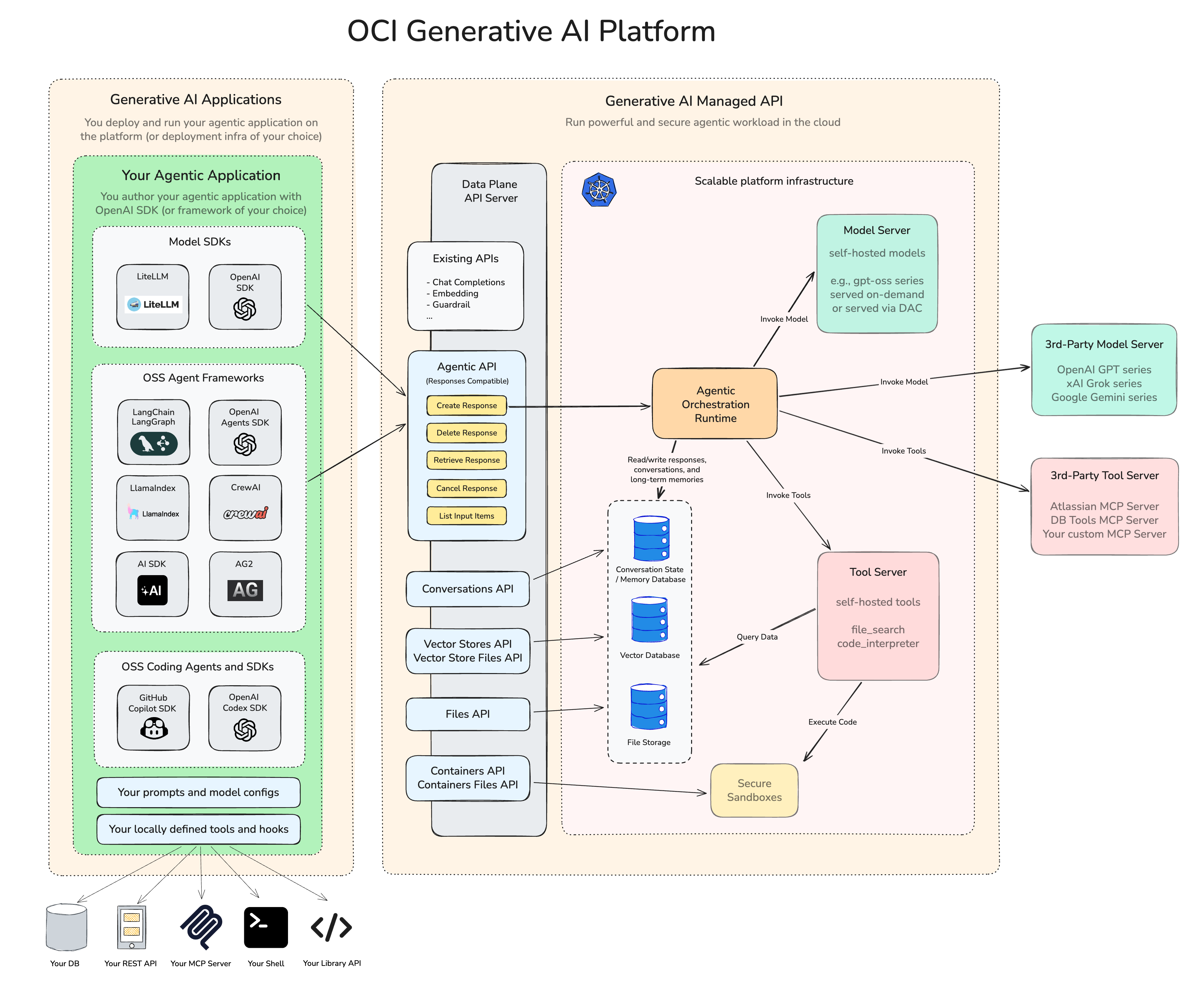
The following diagram shows both the building blocks used to build agents with the OCI Responses API and the deployment components used to run agentic workloads on OCI Generative AI.
On the left side, the diagram shows an agentic application, including model SDKs, agent frameworks, prompts, model configurations, and locally defined tools and hooks. In the center, it shows the OCI Responses API (shown as Agentic API) and related resources, including agent tools, memory, Files API, Vector Stores API, Containers API, and Container Files API. On the right side, it shows the managed runtime and deployment-side components, including scalable platform infrastructure, model servers, tool servers, secure sandboxes, and third-party services.
Related Links
- IAM permissions:
- Give user groups access to all Generative AI resources.
- Give OCI resources access to other OCI resources:
- Set up authentication for agentic support..
- Install the OCI GenAI Auth package.
- Create the OCI Generative AI resources needed for your Enterprise AI task:
- Complete the next step based on the type of vector store:
- For structured data, use the NL2SQL API.
- For unstructured data, sync data to the vector store.