Use Efficient Statement Routing by Enabling ProxySQL on Autonomous AI Database
ProxySQL enables unified access to multiple Autonomous AI Databases by routing statements for DML and queries, and eliminates the need to physically consolidate all the data into a single database.
Topics
- About Efficient Statement Routing with ProxySQL on Autonomous AI Database
ProxySQL on Autonomous AI Database allows you to use multiple Autonomous AI Database instances and makes it easy to access and analyze data as if it was stored in just one place. - Context-Aware Routing
ProxySQL Routing supports context-aware routing, a mechanism that dynamically chooses the target Autonomous AI Database instance for a table at query runtime. - Where Statement Routing with ProxySQL can Provide Application Benefits
Statement routing with ProxySQL is most effective when each SQL statement can be deterministically mapped to a single target Autonomous AI Database instance using schema-level or object-level mappings. - Enable Statement Routing and Define Schema Mapping
This section explains how to set up ProxySQL for automatic statement routing from a main router to one or more target database instances. - Submit Statements Through ProxySQL
To take advantage of automatic statement routing you need to connect to and submit your statements to the router instance managed by ProxySQL. - Stop Routing Statements to a Target Instance
Perform these steps on a target Autonomous AI Database to stop it from stop it from accepting routed statements from the ProxySQL router. - Remove Schema or Object Mapping from Router Instance
Provides the steps to remove a specific mapping from the router database managed by ProxySQL. - Disable Statement Routing
Shows the steps to automatic statement routing by disabling ProxySQL. - Automatic Statement Routing with ProxySQL Notes
Lists limitations and important notes about automatic statement routing when ProxySQL is enabled.
About Efficient Statement Routing with ProxySQL on Autonomous AI Database
ProxySQL on Autonomous AI Database allows you to use multiple Autonomous AI Database instances and makes it easy to access and analyze data as if it was stored in just one place.
You can use ProxySQL when you need to work with a large setup that involves multiple Autonomous AI Databases. ProxySQL gives you unified access to different databases and removes the need to physically move data into one place.
When you enable ProxySQL you designate one Autonomous AI Database instance as a router instance and one or more Autonomous AI Database instances as target instances. The router instance includes a routing table that determines how a statement is distributed (mapped) to one or more target instances. A target instance includes an acceptance table. The acceptance table is similar to the routing table and contains entries specifying that the instance accepts statement redirects from the router.
Depending on the routing method you select, statements are automatically mapped from the router instance to one or more target instances. An application connects to the router instance and runs on the router instance and Autonomous AI Database redirects statements to one or more target instances.
The following are some of the benefits of enabling ProxySQL, as compared to using a single very large Autonomous AI Database:
-
ProxySQL provides database autonomy and independence for operations such as lifecycle management and admin tasks. For example, using ProxySQL, database operations, including backup and restore, and features such as Autonomous Data Guard are managed independently in each Autonomous AI Database instance.
-
ProxySQL allows you to efficiently manage very large databases by dividing data across multiple Autonomous AI Database instances.
There are several terms to know when you work with ProxySQL:
Router Instance: A router instance is designated when you enable ProxySQL. A routing table determines how a statement is distributed (mapped) to one or more target instances. Depending on the specified routing method, statements from the router instance are automatically mapped to one or more target instances.
Target Instance: Target Instance is designated when you create a mapping on the router instance. An acceptance table is added on each target instance.
Routing Table: A routing table contains target mapping entries that specify the instance to which statements are automatically routed.
Acceptance Table: An acceptance table contains entries specifying that the instance accepts statement redirects from the router.
Requirements to Use ProxySQL
The following are ProxySQL requirements:
-
Enabling ProxySQL is only supported for Autonomous AI Database instances that are in an elastic pool. The router instance and all target instances must be members of the same elastic pool.
-
The router instance and all target instances must be in the same region.
-
The metadata for the objects you are routing must match on router and target instances. It is the application designer's responsibility that the metadata for objects present in a target instance are also present in the router instance. For example, if you have a table named
EMPLOYEESin the target instance, then must also have a table with matching metadata namedEMPLOYEESin the router instance. The table in the router instance does not have to be empty (metadata only).
Recommendation for Enabling ProxySQL
The instances you add as the router and as targets can be of any Autonomous AI Database workload type. If there are entries in the routing (mapping) table, then statements on objects specified in those entries are routed to the corresponding target instance(s) regardless of the workload type of the target. Oracle recommends that all the Autonomous AI Database instances use the Lakehouse workload type.
Automatic Statement Routing with ProxySQL Enabled
Using ProxySQL you can distribute statements across targets using any of the supported routing methods.
Whatever routing method (mapping) you decide to use, it is the application schema designer's responsibility to ensure that metadata for objects placed in a target instance are also available in the router instance. For example, if you have a table named
EMPLOYEES
in the target instance, then must also have a table with matching metadata named
EMPLOYEES in the router instance. The table in the router
instance does not have to be empty.
-
Schema-Level Routing: All objects of a schema are mapped to a single target instance. You can map multiple schemas to a single target instance. However, the statements for one schema cannot be mapped across multiple target instances, which means that the same schema cannot be used for both schema and object routing.
To specify Schema-Level Routing you call the
DBMS_PROXY_SQL.ADD_MAPPINGprocedure with theobject_nameparmeter set to the value "*".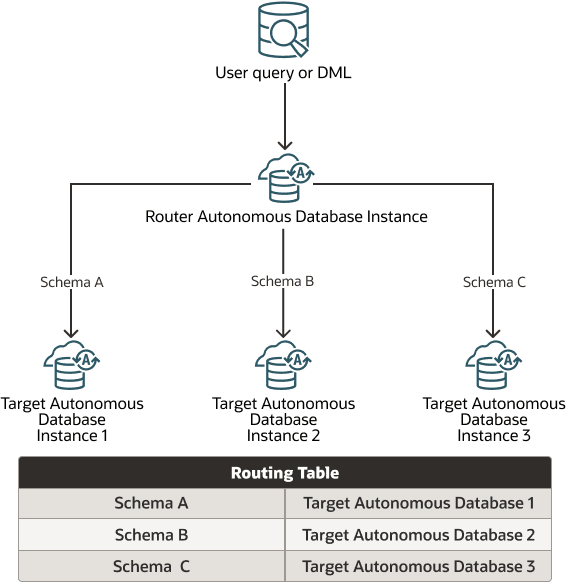
Description of the illustration proxysql_schema.pngIn this example, the metadata for objects in schema A are present in both target Autonomous AI Database 1 and in the router instance, and the metadata for objects in schema B are present in both target Autonomous AI Database 2 and in the router instance, and so on.
-
Object-Level Routing: Objects in a schema are mapped across multiple target instances.
To specify Object-Level Routing you call the
DBMS_PROXY_SQL.ADD_MAPPINGprocedure with theobject_nameparmeter set to a table name.
Description of the illustration proxysql_object.pngIn this example, the metadata for Table A is present in both target 1 and in the router instance, and the metadata for Table B is present in both target 2 and in the router instance, and so on.
-
Hybrid Routing: Objects of a schema are routed using a combination of Schema-level routing and Object-Level Routing.
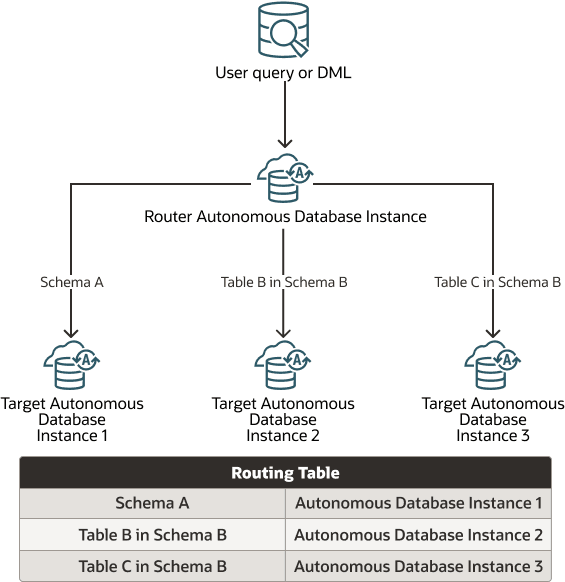
Description of the illustration proxysql_hybrid.pngIn this example, the metadata for Schema A is present in both target Autonomous AI Database 1 and in the router instance, and the metadata for Table B (in Schema B) is present in both target Autonomous AI Database 2 and in the router instance, and so on.
Service Mapping with Automatic Statement Routing When ProxySQL is Enabled
When the routing table indicates a mapping to a target database, the same service you are connected to the router database is used for the data access in the target database.
For example, if a session is connected to the HIGH service on the router instance, a statement or statement fragment routed to a target instance also uses the HIGH service. Similarly, if a session is connected to the MEDIUM service on the router instance, a statement routed to a target instance uses the MEDIUM service.
If the service used to connect on the router instance is not available on a target instance, the statement or statement fragment routed to the target instance uses the MEDIUM service (the available services depends on the Autonomous AI Database workload type).
Current User Semantics for Routed Queries
When configuring routing tables for cross-instance access in Autonomous AI Database, the following criteria must be met:
When configuring cross-instance query routing in Autonomous AI Database, you define mappings between tables or views that reside in different Autonomous AI Database instances. These objects must have the same name and belong to the same schema in both the router instance (where the query is initiated) and the target instance (where the query is run). Clear mapping and appropriate user privileges are essential for consistent and predictable routed queries.
To maintain performance, avoid making frequent changes to the routing table, as this can trigger repeated cursor recompilation and affect the performance. Before modifying the routing table, consider the following:
-
Object Colocation: Whenever possible, place objects that are frequently queried together in the same Autonomous AI Database instance. This optimizes query performance and reduces cross-instance overhead.
-
Data Movement: Make sure required data is present in the appropriate Autonomous AI Database instance. Use export/import utilities or Oracle GoldenGate to facilitate efficient data migration as needed.
-
Cursor Compilation: Adding or removing entries in the routing table can invalidate existing cursors, requiring them to be recompiled. Plan changes to keep invalidations to a minimum.
- In these examples,
DW_USERis a schema present in both the router and target Autonomous AI Database instances. - The
INVENTORYtable exists in theDW_USERschema in both Autonomous AI Database instances. - The user
SCOTTis another database user who may connect to either or both Autonomous AI Database instances and run queries.
-
Object existence requirement: Only tables or views that exist in both the router and target Autonomous AI Database instances, with the same name and within the same schema, can be included in the routing table.
For example:
Note that theBEGIN DBMS_PROXY_SQL.ADD_MAPPING ( object_owner => 'DW_USER', object_name => 'INVENTORY', database_name => 'IBUWLQ4MJQKEILS_DOLLDB' ); END; /INVENTORYtable in theDW_USERschema is mapped for routing. TheINVENTORYtable must exist within theDW_USERschema in both the router and target Autonomous AI Database instances. -
Current user requirement: When a mapped table or view is queried directly in the router Autonomous AI Database instance, the query runs on the target instance as the current user. This user must exist in both the router and target instances.
For example:-- Connected as user SCOTT SELECT ITEM_ID, ITEM_DESCRIPTION FROM DW_USER.INVENTORY;If SCOTT runs a query on
DW_USER.INVENTORY, the routed query will run as SCOTT on the target Autonomous AI Database instance. Therefore, the SCOTT user must exist in both the router and target instances.In addition to existing in both instances, the current user, for example, SCOTT must have appropriate privileges, such as
SELECTon the mapped table or view in both the router and target Autonomous AI Database instances. If required privileges are not granted, access attempts will fail with an error. -
View owner requirement: If the routed query accesses a table or view through a view, the query is run on the target instance as the view owner. The view owner must exist in both the router and target Autonomous AI Database instances, while the querying user only needs to exist in the router instance.
For example:CREATE OR REPLACE VIEW DW_USER.INVENTORY_VIEW AS SELECT ITEM_ID, ITEM_DESCRIPTION FROM DW_USER.INVENTORY;-- Connected as user SCOTT SELECT ITEM_ID, ITEM_DESCRIPTION FROM DW_USER.INVENTORY_VIEW;In this example, when SCOTT queries
DW_USER.INVENTORY_VIEW, the query is run asDW_USER(the view owner) on the target instance. Thus,DW_USERmust exist in both instances, while SCOTT only needs to exist in the router instance. -
View owner privilege requirement: The view owner, for example,
DW_USER, must have the necessary privileges, such asSELECTon the underlying table or view, in both the router and target Autonomous AI Database instances to ensure routed queries can run successfully as the view owner.
Context-Aware Routing
ProxySQL Routing supports context-aware routing, a mechanism that dynamically chooses the target Autonomous AI Database instance for a table at query runtime.
When a table is eligible to be routed to multiple target Autonomous AI Database instances, the final routing decision is influenced not only by the table static mapping, but also by the structure and context of the query. If such a table appears together with other routed tables at the same level of the query - for example, in the same subquery or join clause - ProxySQL Routing prefers to route it to the same target as those other tables, as long as this is allowed by the mapping rules.
If, after applying these rules, there is still more than one valid target Autonomous AI Database instance, ProxySQL Routing chooses one of the eligible targets at random.
SELECT e.name AS emp_name, d.name AS dept_name
FROM scott.emp e, scott.dept d
WHERE e.deptno = d.deptno;
In this example, assume, SCOTT.EMP is mapped to multiple target Autonomous AI Database instances T1 and T2.SCOTT.DEPT is mapped only to target Autonomous AI Database instance T2.This is because SCOTT.EMP and SCOTT.DEPT appear at the same level in the query, ProxySQL Routing routes SCOTT.EMP to T2 to align with the routing of SCOTT.DEPT. This dynamic routing of SCOTT.EMP is only used when the table is explicitly mapped to more than one target. If SCOTT.EMP is not mapped to any target Autonomous AI Database instance, ProxySQL Routing executes the query for SCOTT.EMP on the Router Autonomous AI Database instance itself.
WITH
  sub1 AS (
    SELECT a.c1 r1, b.c1 r2 FROM tab_dup a, tab2 b
  ),
  sub2 AS (
    SELECT a.c1 t1, b.c1 t2 FROM tab_dup a, tab1 b
  )
SELECT * FROM sub1, sub2 ORDER BY 1, 2, 3, 4;
In above example, you will assume TAB_DUP is mapped to both T1 and T2.TAB2 is routed only to T2.TAB1 is routed only to T1. In subquery sub1, TAB_DUP and TAB2 appear together at the same level, so ProxySQL Routing routes TAB_DUP to T2 to co-locate execution with TAB2. In subquery sub2, TAB_DUP appears with TAB1, which is mapped only to T1, so ProxySQL Routing routes TAB_DUP to T1. As a result, TAB_DUP can be routed to different targets in different parts of the same statement, depending on the surrounding query context.
MERGE INTO tab1 t1
USING tab_dup t2
ON (t1.c1 = t2.c1)
WHEN MATCHED THEN
  UPDATE SET t1.c2 = t2.c2;
In the above example, you will assume, TAB_DUP is mapped to both T1 and T2. TAB1 is mapped only to T1.
Here, AB1 and TAB_DUP are referenced at the same level in the MERGE statement. ProxySQL Routing therefore routes TAB_DUP to T1 to align with the location of TAB1. Only the rows of TAB_DUP that are present in T1 participate in the MERGE operation, and updates to TAB1 are based on those values.
Where Statement Routing with ProxySQL can Provide Application Benefits
Statement routing with ProxySQL is most effective when each SQL statement can be deterministically mapped to a single target Autonomous AI Database instance using schema-level or object-level mappings.
When each SQL statement can be deterministically mapped to a single target and you enable statement routing, the work runs where the referenced objects reside. This pattern is beneficial in terms of query performance for the following database architectures:
-
Tenant-per-schema/database layouts
-
Regional partitions
-
Clear domain boundaries (for example,
INVENTORYandBILLING)
When you use statement routing with ProxySQL you can scale very large estates behind a single target Autonomous AI Database instance, without physically consolidating data.
If your analytics require that you combine objects mapped to different target databases in a single ad-hoc query, you should use complementary approaches, rather than relying on statement routing with ProxySQL. Complementary alternative approaches include:
- Use pre-aggregation or materialized views
- Use per-target jobs with a merge step
- Use a reporting store
The following describes a case where statement routing is a good fit and a case where using statement routing is not a good fit:
-
An example that is a good fit: a multi-tenant SaaS application where the application includes the
tenant_idand each tenant's schema is mapped to its own target Autonomous AI Database instance (schema-level mapping withobject_name => '*'). In this case, every request for a tenant is routed to the right target transparently through the router's mapping table. -
An example that is not a good fit: A top level dashboard that issues one SQL statement joining data for "all tenants at once", when those tenants are mapped to different targets. Because statement routing maps statements/objects to specific targets, an application or report with a cross-target join is not a good fit for statement routing. In this type of application, you need to run multiple per-target queries and merge the results or feed a consolidated reporting area instead.
Enable Statement Routing and Define Schema Mapping
This section explains how to set up ProxySQL for automatic statement routing from a main router to one or more target database instances.
- Enable Statement Routing and Define Object Mapping from Router to Target Instances
To set up statement routing, you enable ProxySQL on the router instance and define the schema or objects whose statements are mapped (sent) to target databases. - Accept Statement Routing on Target Instances
You must accept statement routing on a target instance to allow mapping from the router instance.
Enable Statement Routing and Define Object Mapping from Router to Target Instances
To set up statement routing, you enable ProxySQL on the router instance and define the schema or objects whose statements are mapped (sent) to target databases.
The following are prerequisites to enable automatic statement routing:
-
Create the Autonomous AI Database instance that you plan to use for the router instance or identify an existing Autonomous AI Database instance as the router instance.
-
Create the target instances or identify the target instances from existing Autonomous AI Database instances.
-
Ensure that the router instance and any target instance where you are redirecting queries have matching metadata for any objects you are mapping from the router to a target.
Whatever routing method (mapping) you decide to use, it is the application schema designer's responsibility to ensure that metadata for objects placed in a target instance are also available in the router instance. For example, if you have a table named
EMPLOYEESin the target instance, then must also have a table with matching metadata namedEMPLOYEESin the router instance. The table in the router instance does not have to be empty. -
From the available choices, determine the type of statement routing you want to use: Schema-Level Routing, Object-Level Routing, or Hybrid Routing.
To enable automatic statement routing and add target mapping entries to the routing table:
You can query DBA_PROXY_SQL_MAPPINGS view to list the
records in the routing table. See DBA_PROXY_SQL_MAPPINGS View for more information.
Parent topic: Enable Statement Routing and Define Schema Mapping
Accept Statement Routing on Target Instances
You must accept statement routing on a target instance to allow mapping from the router instance.
To allow (accept) statement redirects from the router instance to a target instance:
Parent topic: Enable Statement Routing and Define Schema Mapping
Submit Statements Through ProxySQL
To take advantage of automatic statement routing you need to connect to and submit your statements to the router instance managed by ProxySQL.
When you send queries and DML with ProxySQL enabled, you need to connect to the router instance to take advantage of automatic statement routing.
Stop Routing Statements to a Target Instance
Perform these steps on a target Autonomous AI Database to stop it from stop it from accepting routed statements from the ProxySQL router.
See REJECT_MAPPING Procedure for more information.
Remove Schema or Object Mapping from Router Instance
Provides the steps to remove a specific mapping from the router database managed by ProxySQL.
Disable Statement Routing
Shows the steps to automatic statement routing by disabling ProxySQL.
Run DBMS_PROXY_SQL.DISABLE_ROUTING on the router instance to disable
ProxySQL and to disable automatic statement routing to target instances.
For example:
BEGIN
 DBMS_PROXY_SQL.DISABLE_ROUTING;
END;
/
This disables ProxySQL and disables automatic statement routing on the router.
When you disable ProxySQL, the statement mapping entries in the routing table on the router
instance are not deleted. This means if you re-enable ProxySQL and the routing table has
existing entries, automatic statement routing routes statements to target instances, as
specified in the routing table. Use the procedure DBMS_PROXY_SQL.REMOVE_MAPPING if you wan to remove existing
routing table entries before you re-enable ProxySQL.
See DISABLE_ROUTING Procedure for more information.
Automatic Statement Routing with ProxySQL Notes
Lists limitations and important notes about automatic statement routing when ProxySQL is enabled.
-
The
ADMINuser has the privileges to manage ProxySQL. If you want to enable another user, you must grant the following privileges-
EXECUTEprivilege onDBMS_PROXY_SQLpackage. -
READprivilege on theDBA_PROXY_SQL_MAPPINGSview. -
READprivilege on theDBA_PROXY_SQL_ACCEPTED_MAPPINGSview.
-
-
Automatic statement routing resumes seamlessly when:
-
The target Autonomous AI Database instance fails over to a local Autonomous Data Guard standby.
-
You perform a switchover for a target Autonomous AI Database instance to a local Autonomous Data Guard standby.
However, automatic statement routing stops after a failover or switchover to a cross-region Autonomous Data Guard standby database.
-