Use an AI Proxy Database for Select AI NL2SQL
Autonomous AI Database hosts act as a central metadata and processing layer for both local and external data sources. The AI proxy database controls distributed query processing while external systems remain authoritative for their data.
What Is an AI Proxy Database
An AI proxy database is an Autonomous AI Database instance that runs Select AI on behalf of local or external data sources. It does not contain the external data. Instead, it uses metadata exposed through local database objects (tables and views) that reference remote data sources such as views defined on Database Links or Cloud Links, External Tables over Table Hyperlinks, and Federated Tables to interpret natural language requests and generate SQL that runs across distributed systems. The AI proxy database can also contain local data in its own schema.
In this architecture, an AI proxy database:
-
Hosts Select AI
-
Uses the user-specified LLM to interpret intent and generate SQL
-
Coordinates federated query execution
-
Returns outputs for Select AI actions
This approach enables AI-driven analytics across heterogeneous data stores without migrating or duplicating data.
Autonomous AI Database as an AI proxy database
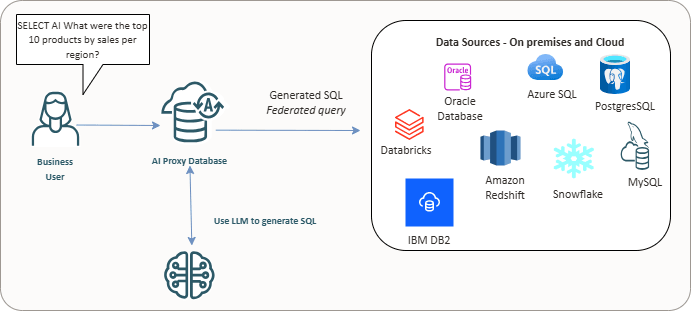
For example, a natural language query such as “Show pending orders for Acme Corp,” Select AI builds an augmented prompt, sends it to the configured LLM to generate SQL, and an AI Proxy Database runs the generated SQL to retrieve customer data from a BigQuery table on Google Cloud and order details from an Amazon Redshift database on AWS. You do not need to write SQL or move data manually. Select AI uses AI profiles and respects existing database roles, security mechanisms, and policies in place to protect data across linked databases. Using a fully managed database with Real Application Security (RAS), AI proxy database powered by Select AI ensures secure and efficient AI-based data access and analysis.
See:
-
Example: Use Select AI with Database Links to Query Another Autonomous AI Database to explore using Select AI to query data on another Autonomous AI Database instance connected through Database Links.
- Example: Use Select AI with Database Links to Query Non-Oracle Database to explore using Select AI to query data on non-Oracle database connected through Database Links.
-
Example: Use Select AI with Cloud Links to Query Another Autonomous AI Database to explore using Select AI to query data on another Autonomous AI Database instance connected through Cloud Links.
-
Example: Use External Table over Table Hyperlink with Select AI to explore using Select AI to query data on another Autonomous AI Database through Table Hyperlink.
-
Example: Use Federated Table with Select AI to explore using Select AI to query data on another Autonomous AI Database by creating Federated table.
Topics
- How Select AI Uses an AI Proxy Database
You create Database Links or Cloud Links to expose remote tables and views to the AI Proxy Database. These objects appear as mapped schemas inside Autonomous AI Database. For Database Links and Cloud Links, you typically create local views over the remote objects and then specify those views in the AI profile. For External Tables and Federated Tables, the created local table objects can be specified directly in the AI profile. You create local views over these Database Links, Cloud Links, External Tables, or Federated Tables and then specify those views in the AI profile. Select AI reads the metadata from these mapped objects and builds an augmented prompt. - Database Links and Cloud Links
The AI Proxy Database uses Database Links and Cloud Links to access external data sources and generate federated SQL through Select AI. Both mechanisms expose metadata to Select AI, but they serve different connectivity and governance needs. - External Tables Over Table Hyperlinks and Federated Tables
Autonomous AI Database supports accessing data in other Autonomous AI Database through External Tables over Table Hyperlinks and Federated Tables. Both methods provide secure, read-only access across regions without data replication, but they differ in setup and control. - Primary Use Case
The primary use case for an AI proxy database with Select AI is for natural language to SQL generation using local metadata that results in federated queries.
Parent topic: Select AI Features
How Select AI Uses an AI Proxy Database
You create Database Links or Cloud Links to expose remote tables and views to the AI Proxy Database. These objects appear as mapped schemas inside Autonomous AI Database. For Database Links and Cloud Links, you typically create local views over the remote objects and then specify those views in the AI profile. For External Tables and Federated Tables, the created local table objects can be specified directly in the AI profile. You create local views over these Database Links, Cloud Links, External Tables, or Federated Tables and then specify those views in the AI profile. Select AI reads the metadata from these mapped objects and builds an augmented prompt.
Select AI sends the augmented prompt to the user-specified LLM, which generates SQL that spans local and remote data sources. The AI Proxy Database runs the federated query, pushes processing to external systems, and completes joins or aggregations as needed. Results return as standard SQL result sets.
From the user’s perspective, the query behaves as if it runs against a single system.
Parent topic: Use an AI Proxy Database for Select AI NL2SQL
Database Links and Cloud Links
The AI Proxy Database uses Database Links and Cloud Links to access external data sources and generate federated SQL through Select AI. Both mechanisms expose metadata to Select AI, but they serve different connectivity and governance needs.
Database Links connect the AI Proxy Database to external databases, Oracle and non-Oracle, using direct network connectivity and credentials. They support heterogeneous environments, including on-premises systems, legacy Oracle databases, and third-party databases such as PostgreSQL, MySQL, SQL Server, Amazon Redshift, Snowflake, and others. With Database Links, Select AI reads table and view metadata from remote schemas and generates federated NL2SQL that runs across distributed systems while data remains in its source database. See CREATE DATABASE LINK for more details.
Cloud Links connect one Autonomous AI Database to another in a controlled and secure way. A data owner chooses which tables or views to share and makes them available to other Autonomous AI Databases. Once shared, other databases can find and use this data without setting up usernames, passwords, wallets, or network connections. The data remains read-only and stays in the source database, while the sharing rules are centrally managed. Cloud Links are designed specifically for sharing data between Autonomous AI Databases in a simple and governed manner. See Use Cloud Links for Read Only Data Access on Autonomous AI Database for more details.
In both cases, Select AI relies on exposed local metadata, not physical data movement, to interpret natural language prompts and generate SQL. The AI Proxy Database coordinates query execution, while external systems remain authoritative for their data and enforce their own security controls.
Supported External Data Sources
When used as an AI Proxy Database, Autonomous AI Database can operate on data stored in a wide range of external systems, including but not limited to:
-
Oracle Autonomous AI Database (including previous versions such as 19c)
-
Oracle AI Database instances
-
PostgreSQL
-
MySQL
-
SQL Server
-
Azure SQL
-
DB2
-
Teradata
-
Amazon Redshift
-
Snowflake
-
Databricks
-
Salesforce
Support depends on network accessibility and the use of Database Links or Cloud Links. See Create Database Links to Non-Oracle Databases with Oracle-Managed Heterogeneous Connectivity for a complete list of supported non-Oracle databases.
Parent topic: Use an AI Proxy Database for Select AI NL2SQL
External Tables Over Table Hyperlinks and Federated Tables
Autonomous AI Database supports accessing data in other Autonomous AI Database through External Tables over Table Hyperlinks and Federated Tables. Both methods provide secure, read-only access across regions without data replication, but they differ in setup and control.
External Tables over Table Hyperlinks use a URL (Table Hyperlink)
generated in the provider (source) Autonomous AI Database with DBMS_DATA_ACCESS.CREATE_URL. The consumer
(target) Autonomous AI Database then creates
an external table referencing this hyperlink using
DBMS_CLOUD.CREATE_EXTERNAL_TABLE. This approach offers fine-grained
control, letting you expose individual tables or views and manage hyperlink lifetimes
directly. It’s best suited for ad-hoc or selective data sharing where administrators
prefer explicit control over which objects are accessible. See Use Table Hyperlinks to Create an External Table
for more details.
Federated Tables, provide an automated way to access remote Autonomous AI Database data. A federated table
is created in the consumer database using
DBMS_DATA_ACCESS.CREATE_FEDERATED_TABLE, which automatically
manages hyperlink creation and metadata mapping behind the scenes. This method
simplifies setup and is ideal for long-term, multi-object, or cross-region federation.
Federated Tables integrate tightly with Autonomous AI Database governance using registered creation scopes and
DBMS_DATA_ACCESS_ADMIN grants, and are designed for
production-level, managed access across compartments or tenancies. See Create Federated Tables using Table Hyperlinks by
Defining Scope for more details.
In summary, use External Tables over Table Hyperlinks when you need precise, short-term control over shared objects, and Federated Tables when you want a streamlined, scalable, and fully managed cross-database integration for Select AI. In both cases, Select AI relies on exposed metadata, not physical data movement, to interpret natural language prompts and generate SQL. The AI proxy database coordinates query execution, while external systems remain authoritative for their data and enforce their own security controls.
Parent topic: Use an AI Proxy Database for Select AI NL2SQL
Primary Use Case
The primary use case for an AI proxy database with Select AI is for natural language to SQL generation using local metadata that results in federated queries.
Federated queries: Your data platform may include on-premises relational databases, Autonomous AI Database, Oracle AI Database, data lakes, legacy systems, or third-party data stores. You can use Select AI to query alongside Autonomous AI Database through Database Links or Cloud Links as a sidecar.
The AI Proxy Database coordinates query running while external systems process their data in place. This keeps data in its original location and avoids replication, synchronization, or ETL.
Key Benefits:
-
Keep data in source systems
-
Avoid ETL, replication, and data movement
-
Query Oracle and non-Oracle databases together
-
Extend generative AI and NL2SQL to legacy and cloud systems
-
Use a single Select AI interface across your data sources
Parent topic: Use an AI Proxy Database for Select AI NL2SQL